EduPark

March 2026·10 updates

What's New: Issue 02, March 2026

New for students and schools every month

Cover story·01 / 10New

Full-length SAT practice tests that adapt like the real one

Each mock exam follows the digital SAT's format and timing. Your second module in each section gets harder or easier based on how you did on the first, the way the real test works. When you finish, you get a scored report with your section results.

For students & families·

The Full SAT Test card lists 98 questions in 2 hours 14 minutes with adaptive difficulty and a full score report; a finished test's SAT Score Report shows 1230 overall (Reading and Writing 720, Math 510) beside the four modules the student took.

In this issue

NewFor educators & schools

Put your students in classes and manage them in one place

Create a class for each group you teach and add your students to its roster. Every class and every student lives in your organization's console, so you always know who is enrolled where.

A class's Members tab lists its 33 students with their alerts, then Add Students opens the organization's joined students and one is ticked to add to the class.
NewFor students & families

Tutor Mode: a step-by-step walkthrough for every practice question

Every practice question comes with a walkthrough that shows you how to solve it, one step at a time. After you answer, tap Start Walkthrough to see the key lines highlighted, wrong choices crossed out and the math worked through. It ends with the traps to watch for and tips for next time.

After answering a practice question, the student taps Start Walkthrough and Tutor Mode works through the solution one step at a time, highlighting the key words in the question.
A Learn lesson on solving linear equations: the student plays its video walkthrough, then switches from Video to Text to read the written lesson.
New

Video lessons in Learn

Many lessons in Learn now come with a video that walks through the concept. Watch it, read the written lesson, or both, then try the practice questions.

For students & families·

A class page's Add to curriculum leads to the assignment wizard, where the assignment is named and Practice Session is picked from types including Learning Module, Section Exam and Full Mock Exam.
New

Assign practice and homework to a whole class

Instructors can assign practice sets, mock exams, or Learning Hub modules to an entire class at once, and track completion from the class page.

For educators & schools·

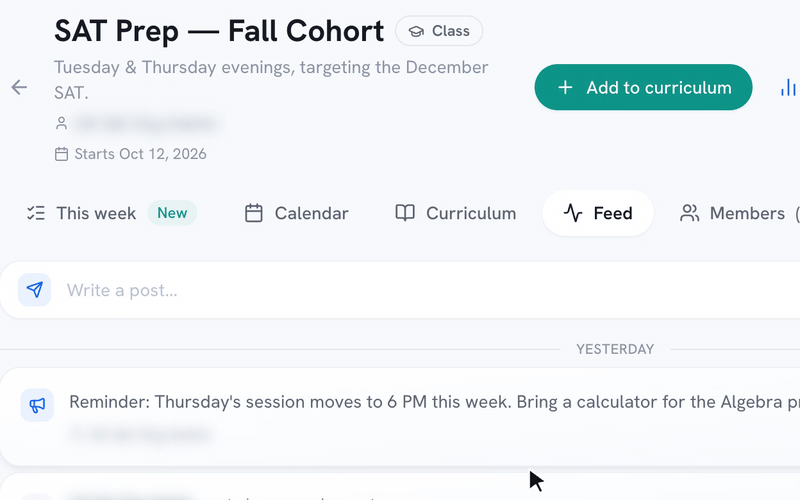
A teacher types an announcement on a class's Feed and posts it, and it appears at the top of the Feed for every student in the class.
New

Post announcements to a class

Post an announcement on a class's Feed, and every student in the class gets a notification. Schedule changes and reminders sit right next to the class's assignments.

For educators & schools·

The Performance page for one class shows participation, average score and mock exams, its Trends tab charts daily active users, and one student's profile shows their estimated score, mock exams and practice sessions.
New

See how every student is doing

The Performance page shows estimated scores, mastery, participation and topic trends across your roster, and instructors see the students in their own classes. Open any student to see their mock exams, practice sessions, assignment results and topic breakdown.

For educators & schools·

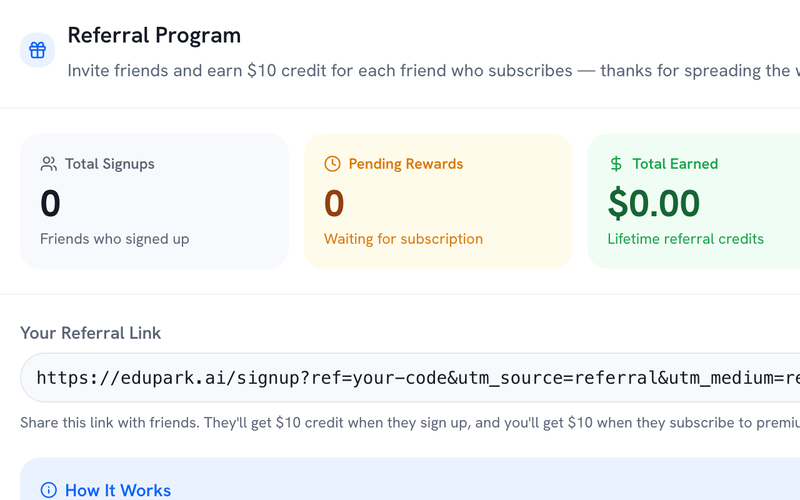
The Referral Program card on the Billing & Rewards tab: the student's signups, pending rewards and earnings, their referral link, and how the $10 rewards work.
New

Give a friend $10 and get $10 when they subscribe

Share your referral link from the Billing & Rewards tab on your Profile. Your friend gets $10 in credit when they sign up, and you get $10 when they subscribe to a paid plan. Your credit comes off your next subscription payment automatically.

For students & families·

The Email parents dialog with a note and the progress report link switched on, then the report a parent opens without logging in: estimated SAT score, score trend and topic breakdown.
New

Email parents a progress report

Send a progress report to every parent on a student's record, for one student or a whole class at once. Parents open the link without logging in and see the student's estimated score, score trend, strong and weak topics, study time and recent assignments.

For educators & schools·

A missed question on the Review page with the student's answer in red and the correct one in green; in its What went wrong? row the student taps Misread it, then changes the label to Careless slip.
Improved

Mark what went wrong on each missed question

When you review a question you missed, a What went wrong? row shows our best guess: Careless slip, Didn't know it, Ran out of time or Misread it. Tap a different label if the guess is wrong.

For students & families·

More issues